

The Sucuri Monitoring dashboard can be accessed and manipulated using the Monitoring API.
Activation
You can find the Monitoring API activation page within the Settings tab of the monitoring dashboard.
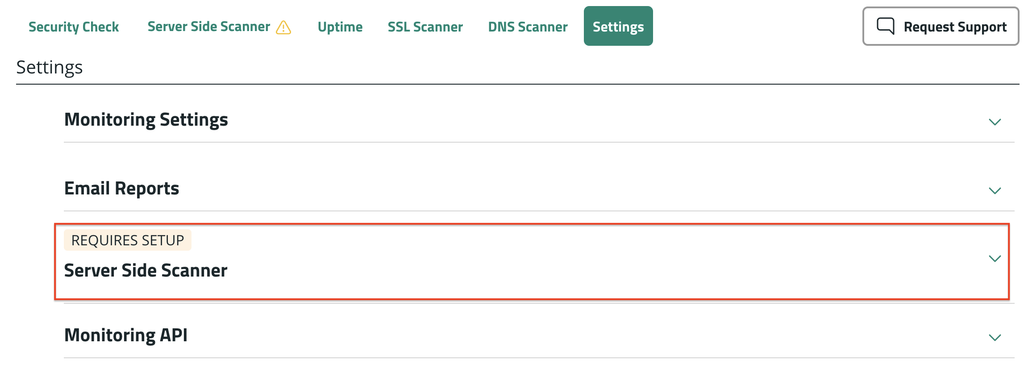
- Select the dropdown for Monitoring API.
- Under Dashboard API, use the toggle to enable the feature.
- Select Show Key and then Copy. Store the key in a safe password manager to reference later. The key will not be shown again.
Technical Details
Base URL: https://api.sucuri.net/v2
Authentication Requirements
Every API request must include two headers:
- X-Customer-Id — Your customer ID (used to validate your API key)
- Authorization — Your bearer API key in the format:
bearer api_key
If you are running these commands programmatically and not through curl, be sure to specify a User Agent in the request. You can use any User Agent, but if left empty, the request will return a 403 error.
Set environment variables (recommended for repetitive use):
export BASE_URL="https://api.sucuri.net/v2"
export CUSTOMER_ID="<your-customer-id>"
export TOKEN="<your-api-token>"
Available Endpoints
View Your Monitored Sites
Endpoint: GET /security/monitors-sites
What it does: Retrieves a list of all websites currently being monitored.
Returns: A list of your monitored sites with their scanner IDs and configuration details.
Example response:
json
{
  "scanners": [
    {
      "host": "a2ee93bb-dc0c-4a61-ead2-74d2a7d1b888",
      "server-side-upload": "1cc1125c2-6ec1-4b18-870e-395c348a1290",
      "sss": "884c13a7-d09c-46f5-9874-0abc5836b3c7",
      "tls": "b02a3abc-a4db-4859-b8db-6de726211d1f",
      "uptime": "8294a25d-fd6a-4422-bd14-b1539f4a6b1d",
      "www": "812b4e06-2b36-414d-9b84-3e7c9909722c"
    }
  ]
}
Manage Individual Sites
Update HTTPS Monitoring
Endpoint: PATCH /security/monitors-sites/{site-id}
What it does: Enable or Disable HTTPS monitoring.
Update scan settings
Endpoint: PATCH /security/web-scanners/{scanner-id}
What it does: Adjust scan frequency and enable/disable scanning for specific sites.
Remove a Site from Monitoring
Endpoint: DELETE /security/monitors-sites
What it does: Removes a website from your monitoring list.
View Scan History
Endpoint: GET /security/web-scanners/{scanner-id}/scans
What it does: Retrieves the scan history for a specific website. You’ll need the scanner ID from your monitored sites list.
Trigger a New Scan
Endpoint: POST /security/web-scanners/{scanner-id}/scan
What it does: Manually initiates a new security scan for a specific website.
Scanner types overview
- www: Remote scan of public pages for malware/defacement/blocklists.
- host: Host/server-focused checks tied to the site; complementary to www and uptime.
- tls: SSL/TLS certificate validity/configuration/expiry monitoring.
- uptime: Availability checks (HTTP reachability/response) at short intervals.
- server-side-upload: Server Side Scanner- phase 1
- sss: Server Side Scanner- phase 2
Accepted frequencies by scanner type
- www/host/tls: 30, 60, 180, 240, 360, 720, 1440 minutes
- uptime: 5, 10, 20, 30, 60 minutes
- sss: 720, 1440 minutes
Understanding Scanner IDs
When you retrieve your monitored sites list, each site returns a {scanner-id}. You’ll need this ID to:
- View scan history for that site
- Trigger new scans
- Update scan settings
The scanner ID is a unique identifier that looks like: 884c13a7-d09c-4f5-9874-0abc5836b3c7
The scanner ID associated with the different scanning types can be retrieved using the following Endpoint: GET /v2/security/monitors-sites
Advanced
This portion provides curl examples and anonymized responses for the Monitors API that you can copy-paste. Replace placeholders before running.
List all monitored sites
Returns the collection of sites under your account with basic flags and per‑site scanner IDs.
curl --location "$BASE_URL/security/monitors-sites" \
  --header "Authorization: Bearer $TOKEN" \
  --header "X-Customer-Id: $CUSTOMER_ID"
Query parameters (optional):
page: integer, starting at 1pageSize: integer, e.g., 10, 25, 50totalRequired: boolean (true/false) to include total count metadata
Example with pagination:
curl --location "$BASE_URL/security/monitors-sites?pageSize=10&page=1&totalRequired=false" \
  --header "Authorization: Bearer $TOKEN" \
  --header "X-Customer-Id: $CUSTOMER_ID"
Example response (anonymized):
{
  "items": [
    {
      "siteId": "382abd1c-92a4-41af-8df4-a9f3f00d8201",
      "domain": "domain01.com",
      "seal": null,
      "https": false,
      "warnLevel": 512,
      "bundle": null,
      "scanners": {
        "uptime": "fe0c3695-f384-4279-a0f4-464227a46ea6",
        "www": "62f5b229-eef9-42d1-8b63-041f5c92a06b"
      }
    }
  ]
}
Get details for scanner (per site)
Use a scanner ID from the list endpoint (e.g., scanners.www, scanners.uptime, etc.). This returns that scanner’s configuration and status for the site.
SCANNER_ID="<scanner-id>"
curl --location "$BASE_URL/security/web-scanners/$SCANNER_ID" \
  --header "Authorization: Bearer $TOKEN" \
  --header "X-Customer-Id: $CUSTOMER_ID"
Response fields (commonly observed):
siteId: UUID of the site this scanner belongs toscanType: one ofwww,host,mcs,tls,uptime,sssenabled: booleanfrequency: integer minutes (must match accepted set for the scanType)nextRunAt: ISO-8601 timestamp for the next scheduled run (if enabled)- Other read-only status fields may be present depending on scanType
Example response (shape may vary by scanner type; example fields shown):
{
  "id": "62f5b229-eef9-42d1-8b63-041f5c92a06b",
  "scanType": "www",
  "enabled": true,
  "frequency": 720,
  "lastRunAt": "2025-11-30T15:22:41Z",
  "latestStatus": "clean"
}
Tip: find a SITE_ID by domain using the list endpoint:
curl --silent "$BASE_URL/security/monitors-sites?pageSize=100" \
  --header "Authorization: Bearer $TOKEN" \
  --header "X-Customer-Id: $CUSTOMER_ID" \
| jq -r '.items[] | select(.domain == "domain01.com") | .siteId'
Update a site’s HTTPS setting
Only HTTPS is supported here; use JSON Patch format.
SITE_ID="<site-id>"
curl --location --request PATCH "$BASE_URL/security/monitors-sites/$SITE_ID" \
  --header "Authorization: Bearer $TOKEN" \
  --header "X-Customer-Id: $CUSTOMER_ID" \
  --header "Content-Type: application/json" \
  --data '[
    { "op": "replace", "path": "/https", "value": true }
  ]'
Values:
/https: boolean (trueto enable,falseto disable)
Disable HTTPS example:
SITE_ID="<site-id>"
curl --location --request PATCH "$BASE_URL/security/monitors-sites/$SITE_ID" \
  --header "Authorization: Bearer $TOKEN" \
  --header "X-Customer-Id: $CUSTOMER_ID" \
  --header "Content-Type: application/json" \
  --data '[
    { "op": "replace", "path": "/https", "value": false }
  ]'
Expected response:
- 204 No Content (common)
- 200 OK with updated site object (less common; shape may mirror list item)
Update a scanner’s settings (frequency, enabled)
Use the scanner ID for the target scan type. Accepted frequencies depend on the scan type.
SCANNER_ID="<scanner-id>"
curl --location --request PATCH "$BASE_URL/security/web-scanners/$SCANNER_ID" \
  --header "Authorization: Bearer $TOKEN" \
  --header "X-Customer-Id: $CUSTOMER_ID" \
  --header "Content-Type: application/json" \
  --data '[
    { "op": "replace", "path": "/frequency", "value": 720 },
    { "op": "replace", "path": "/enabled",   "value": false }
  ]'
Accepted frequencies (in minutes):
www: {30, 60, 180, 240, 360, 720, 1440}host: {30, 60, 180, 240, 360, 720, 1440}mcs: {30, 60, 180, 240, 360, 720, 1440}tls: {30, 60, 180, 240, 360, 720, 1440}uptime: {5, 10, 20, 30, 60}sss: {720, 1440}
Fields:
/frequency: number (minutes), must match accepted set for the scanner’sscanType/enabled: boolean
Enable or disable a scanner:
SCANNER_ID="<scanner-id>"
curl --location --request PATCH "$BASE_URL/security/web-scanners/$SCANNER_ID" \
  --header "Authorization: Bearer $TOKEN" \
  --header "X-Customer-Id: $CUSTOMER_ID" \
  --header "Content-Type: application/json" \
  --data '[
    { "op": "replace", "path": "/enabled", "value": true }
  ]'
Expected response:
- 204 No Content (common)
- 200 OK with updated scanner (occasionally), e.g.:
{
  "siteId": "382abd1c-92a4-41af-8df4-a9f3f00d8201",
  "scanType": "www",
  "enabled": true,
  "frequency": 720,
  "nextRunAt": "2025-12-02T00:00:00Z"
}
Add a site to monitoring
Minimal body includes the domain and the monitors you want to start with. Frequencies are minutes.
curl --location "$BASE_URL/security/monitors-sites" \
  --header "Authorization: Bearer $TOKEN" \
  --header "X-Customer-Id: $CUSTOMER_ID" \
  --header "Content-Type: application/json" \
  --data-raw '{
    "site": {
      "domainName": "domain.tld",
      "https": true,
      "monitoring": [
        { "scanType": "www", "frequency": 1440 }
      ]
    }
  }'
Notes:
scanTypeoptions include:www,host,tls,uptime,sss,mcsfrequencymust be valid for the chosenscanType(see above)- No customer “shopperId” is required by clients here
Example (domain01.com): add with daily WWW and TLS monitoring
curl --location "$BASE_URL/security/monitors-sites" \
  --header "Authorization: Bearer $TOKEN" \
  --header "X-Customer-Id: $CUSTOMER_ID" \
  --header "Content-Type: application/json" \
  --data-raw '{
    "site": {
      "domainName": "domain01.com",
      "https": true,
      "monitoring": [
        { "scanType": "www", "frequency": 1440 },
        { "scanType": "tls", "frequency": 1440 }
      ]
    }
  }'
Add with multiple scan types and mixed frequencies:
curl --location "$BASE_URL/security/monitors-sites" \
  --header "Authorization: Bearer $TOKEN" \
  --header "X-Customer-Id: $CUSTOMER_ID" \
  --header "Content-Type: application/json" \
  --data-raw '{
    "site": {
      "domainName": "domain01.com",
      "https": true,
      "monitoring": [
        { "scanType": "www",   "frequency": 720  },
        { "scanType": "host",  "frequency": 1440 },
        { "scanType": "tls",   "frequency": 1440 },
        { "scanType": "uptime","frequency": 60   }
      ]
    }
  }'
Expected response:
- 201 Created (or 200 OK), with the created site and assigned scanner IDs:
{
  "siteId": "6b6d2a65-6a0c-4f7b-8b7f-1b3a9a0d0001",
  "domain": "domain01.com",
  "https": true,
  "warnLevel": 0,
  "scanners": {
    "www": "1f5a7f8e-9a76-4b23-8b4b-2a3f1cde0001",
    "tls": "9d1a0e7c-2f63-4a2b-8e8d-1c0b2a3d0002"
  }
}
Remove a monitored site
Preferred (path parameter):
SITE_ID="<site-id>"
curl --location --request DELETE "$BASE_URL/security/monitors-sites/$SITE_ID" \
  --header "Authorization: Bearer $TOKEN" \
  --header "X-Customer-Id: $CUSTOMER_ID"
If your environment requires the header variant instead:
SITE_ID="<site-id>"
curl --location --request DELETE "$BASE_URL/security/monitors-sites" \
  --header "Authorization: Bearer $TOKEN" \
  --header "X-Customer-Id: $CUSTOMER_ID" \
  --header "siteId: $SITE_ID"
Note: In some environments the path variant returns 405 for DELETE. Use the header-based siteId deletion shown above.
Expected response:
- 204 No Content
View scan history
Returns historical scans for the scanner type referenced by SCANNER_ID. This is per‑scanner, per‑site.
SCANNER_ID="<scanner-id>"
curl --location "$BASE_URL/security/web-scanners/$SCANNER_ID/scans" \
  --header "Authorization: Bearer $TOKEN" \
  --header "X-Customer-Id: $CUSTOMER_ID"
Pagination example:
SCANNER_ID="<scanner-id>"
curl --location "$BASE_URL/security/web-scanners/$SCANNER_ID/scans?page=1&pageSize=25" \
  --header "Authorization: Bearer $TOKEN" \
  --header "X-Customer-Id: $CUSTOMER_ID"
Expected response (anonymized):
{
  "items": [
    {
      "scanId": "a1b2c3d4-e5f6-4a1b-9c0d-111213141516",
      "startedAt": "2025-12-01T12:00:00Z",
      "finishedAt": "2025-12-01T12:02:10Z",
      "status": "clean",
      "summary": {
        "malware": false,
        "blacklist": false,
        "ssl": "valid"
      }
    },
    {
      "scanId": "b2c3d4e5-f6a1-4b9c-0d11-121314151617",
      "startedAt": "2025-11-30T12:00:00Z",
      "finishedAt": "2025-11-30T12:01:55Z",
      "status": "clean",
      "summary": {
        "malware": false,
        "blacklist": false,
        "ssl": "valid"
      }
    }
  ],
  "links": {
    "self": "/v2/security/web-scanners/62f5b229-eef9-42d1-8b63-041f5c92a06b/scans?page=1&pageSize=25",
    "next": ""
  }
}
Start a new scan
Creates a new scan for that specific scanner (type determined by the scanner itself).
SCANNER_ID="<scanner-id>"
curl --location --request POST "$BASE_URL/security/web-scanners/$SCANNER_ID/scans" \
  --header "Authorization: Bearer $TOKEN" \
  --header "X-Customer-Id: $CUSTOMER_ID"
Expected response:
- 202 Accepted (common) or 201 Created, with a job/scan identifier:
{
  "scanId": "c3d4e5f6-a1b2-4c9d-0e11-131415161718",
  "status": "queued",
  "scanType": "www",
  "siteId": "382abd1c-92a4-41af-8df4-a9f3f00d8201",
  "queuedAt": "2025-12-01T12:05:00Z"
}
Run a Security Check (www) scan for a given domain
Triggers a remote WWW scan by domain, without needing a scanner ID.
DOMAIN="domain01.com"
curl --location "$BASE_URL/security/www-web-scans?resource=$DOMAIN" \
  --header "Authorization: Bearer $TOKEN" \
  --header "X-Customer-Id: $CUSTOMER_ID"
Example (domain01.com):
curl --location "$BASE_URL/security/www-web-scans?resource=domain01.com" \
  --header "Authorization: Bearer $TOKEN" \
  --header "X-Customer-Id: $CUSTOMER_ID"
Expected response:
- 202 Accepted (common) or 201 Created:
{
  "scanId": "d4e5f6a1-b2c3-4d9e-0f11-141516171819",
  "status": "queued",
  "resource": "domain01.com",
  "scanType": "www",
  "queuedAt": "2025-12-01T12:06:10Z"
}
Field notes and clarifications
https(site setting): booleanfrequency: integer minutes; must match the accepted set for the chosenscanTypewarnLevel,bundle,seal: informational fields returned in lists; not configurable via examples above- History vs. types: history is returned per scanner (so the type is implicit in the chosen
SCANNER_ID)
Disabling the API
- In the Monitoring Settings page, under Dashboard API, use the toggle button to disable the Monitoring API.
- Confirm your action by selecting Disable.
By disabling the Monitoring API, your current API key will no longer work. Re-enabling the API will generate a new key for you to use.