

If your website runs on more than one server, or you have a standby server for emergencies, you can add each server’s IP address to the Sucuri Firewall. The firewall can share traffic between your servers and automatically send visitors to another server if one becomes unreachable.
Add a Hosting Address
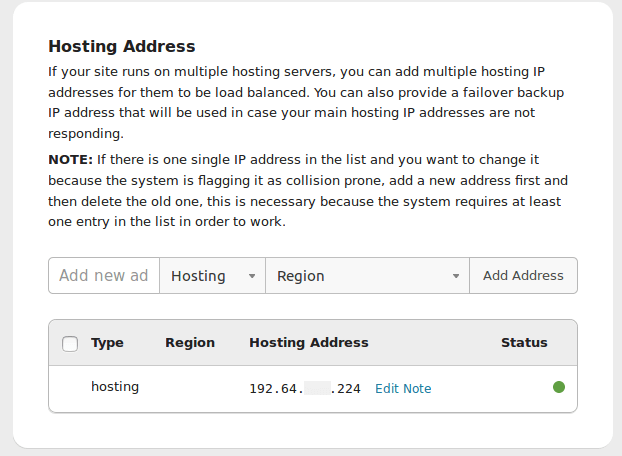
-
In the Firewall dashboard, go to Settings → Hosting IP Address
-
Choose an address type:
- Hosting: Receives traffic from all regions.
- Backup: Only receives traffic when none of your hosting servers can be reached.
- Region: Receives traffic for a specific region, such as North America, Europe, or Asia. North America also has West, Central, and East options.
3. Enter the server’s IP address and select Add Address.
You can Pause an address to take it out of service without deleting it, you might want to do this during maintenance. The firewall does not send traffic to a paused address until you resume it.
Multiple Hosting Addresses
With two or more hosting addresses, the firewall shares your visitors between them. Each visitor always goes to the same server, so logins, carts and sessions keep working even if your servers don’t share sessions.
If one of your servers stops responding, the firewall moves the visitors who were using it to your other hosting servers, and moves them back when the server returns. Visitors on your healthy servers aren’t moved.
Cross-region Load Balancing
If your servers are in different parts of the world, you can assign each one a region. For example, visitors in Europe can use your European servers, while visitors in North America use your North American servers.
The visitor’s region is based on the Sucuri Firewall server handling their request, which is usually the one closest to them.
Keep these points in mind:
- Servers in another region are a fallback. They’re only used when all servers serving the visitor’s region are down.
- A Hosting address without a region specified serve every region. You can combine them with region-specific addresses.
- Regions without an assigned server use the first working address in your list.
- For better availability, add two servers per region. If one fails, the other can keep serving visitors in that region.
Backup Hosting Address
A Backup address is a standby server. It receives no traffic while any hosting server is reachable.
The firewall switches to a backup when none of your hosting servers can be reached. This can happen when servers:
- Refuse the connection.
- Don’t respond to a connection attempt—for example, because they’re powered off or their network is down.
- Can’t establish a secure TLS connection.
When a hosting server becomes reachable again, traffic automatically returns to it, and the backup goes back to standby.
If you add multiple backups, the first working backup in your list receives all traffic. The next backup is used only if the first one fails.
Failover Timing
Switching to another server is called failover.
|
Scenario |
Time |
|---|---|
|
The firewall waits for a server that doesn’t answer |
Up to 5 seconds per attempt. A server that refuses the connection is detected immediately. |
|
Switching to your other servers when one goes down |
Up to about 10 seconds. During that time some visitors may see an error page. |
|
Going back to a server that has recovered |
About 10 seconds after it is reachable again. Nothing to do on your side. |
Sucuri’s firewall runs on servers around the world. Each firewall server detects failures independently, so visitors may experience this short switching delay more than once as different firewall servers detect the problem.
What Failover does not Cover
Automatic failover responds to connection problems, not every website problem.
- If your server responds with an error such as 500 or 503, the firewall retries that request once on another server. However, it doesn’t stop sending traffic to the server that returned the error. A problem with one page shouldn’t take an entire server out of service.
- If the server accepts the connection but doesn’t reply, the request times out after 60 seconds. The firewall doesn’t send that request to another server.
For either issue, check your server or contact your hosting provider. To stop traffic to the affected server yourself, Pause its address in the firewall dashboard.
Check Which Server Handled a Request
You can configure each server to return a response header with a unique name. For example: X-Served-By: server-1. Use a different value for each server, such as server-1 and server-2.
Then run:
curl -s -o /dev/null -D - https://yourdomain.com/
If you need to know when the firewall detected a server going down or coming back online, please create a ticket. These changes are logged for each website.